Building a Shell in C#: Software Architecture Lessons That Apply Anywhere
Lessons on dependency injection, testability, and design decisions from building a command-line shell from scratch
Building a shell from scratch reinforced lessons I’ve learned in production systems, but with different constraints. Without HTTP, databases, or authentication layers, architectural decisions become stark. There’s nowhere to hide bad design.
Here’s what I learned: implementing pipelines is straightforward, and parsing commands is textbook CS. What actually burned most of my time? Circular dependencies in the dependency injection (DI) container.
This post covers four architecture lessons you can apply immediately: why the user-facing layer is always more complex than you expect, when optimization actually matters, how to catch circular dependencies before runtime, and why testability is a design choice, not an afterthought.
What I built: A shell with tab completion, command history, I/O redirection, and cross-platform support
Tech stack: C#, .NET 9.0, Microsoft.Extensions.DependencyInjection
Source code: github.com/Diego-Paris/codecrafters-shell-csharp
The Input Layer’s Hidden Complexity
Command execution is straightforward: parse arguments, spawn a process, capture output. Parsing is textbook: tokenize on whitespace, handle quotes. The input handler? That’s where the complexity lives.
The problem: Console.ReadLine() gives you a finished line. No tab completion. No arrow key navigation. No way to intercept individual keystrokes. For a real shell, I needed to read keys one at a time and manage my own input buffer.
Here’s the core loop:
1
2
3
4
5
6
7
8
9
10
11
12
13
14
15
16
17
18
19
public string? ReadInput(string prompt)
{
    _console.Write(prompt);
    var state = new InputState { HistoryIndex = _context.CommandHistory.Count };

    while (true)
    {
        var key = _console.ReadKey(intercept: true);

        if (key.Key == ConsoleKey.Enter)
            return state.Buffer.ToString();

        if (key.Key == ConsoleKey.UpArrow)
            HandleUpArrow(prompt, state);
        else if (key.Key == ConsoleKey.Tab)
            HandleTab(prompt, state);
        // ... handle other keys
    }
}
Turns out implementing arrow key history is subtle. When you press down at the end of history, bash restores what you were typing before you started navigating. Not a blank line. That requires tracking whether you’ve started navigating history and saving the unsent input.
The Lesson
More complexity than you’d expect lives in the user-facing layer. Backend devs discover this when they work on the frontend. CLI devs find it when building their first REPL. The user-facing layer is where your clean logic meets messy reality.
This applies everywhere:
- REST APIs tend to be deterministic. The human using the web UI isn’t.
- Database queries are straightforward. The ORM mapping edge cases aren’t.
- Your core logic is clean. The input validation and error handling doubles the code.
Plan accordingly. Don’t treat the interface as an afterthought.
Premature Optimization is a Trap
Tab completion seems simple: find all commands that start with what the user typed. The naive approach:
1
2
3
4
public IEnumerable<string> GetCompletions(string prefix)
{
    return _allCommands.Where(cmd => cmd.StartsWith(prefix));
}
This works. It’s also O(n) where n is the number of commands. On my system, there are 2000+ executables in PATH. Every tab press iterates through all of them.
I implemented a trie (prefix tree) for O(m) lookups where m is the prefix length. At startup, I build the trie with all commands. On tab press, I traverse it using the prefix characters and collect matches.
1
2
3
4
5
6
7
8
9
10
11
public IEnumerable<string> GetPrefixMatches(string prefix)
{
    var current = _root;
    foreach (var ch in prefix)
    {
        if (!current.Children.TryGetValue(ch, out var next))
            return Enumerable.Empty<string>();
        current = next;
    }
    return CollectAllWords(current);
}
The Lesson
Know your data size before optimizing. 2000+ commands justified the trie. With 20 commands, the naive approach would be perfectly fine. The optimization only makes sense at scale.
This applies to:
- Database indexing: don’t index a table with 100 rows
- Caching strategies: don’t cache data that’s faster to recompute
- Algorithm choices: O(n log n) vs O(n²) doesn’t matter for n = 10
Measure first. Optimize when you have numbers that justify it.
With performance out of the way, the next set of challenges had nothing to do with speed. They were structural. As the number of components grew, the more it became clear that the architecture itself needed guardrails. That is where dependency management became the real problem.
Circular Dependencies Break Silently
I used Microsoft’s DI container throughout the shell. Using a DI container in a shell is unconventional, but it exposed the architectural tradeoffs I wanted to study.
Every command is an ICommand service. The shell context is a singleton. Tab completion, history, PATH resolution, all registered services.
Here’s the setup:
1
2
3
4
5
6
7
8
9
services.AddSingleton<IPathResolver, PathResolver>();
services.AddSingleton<IShellContext, ShellContext>();
services.AddSingleton<IHistoryService, HistoryService>();
services.AddSingleton<ICompletionTrie, CompletionTrie>();

// All commands implement ICommand
services.AddSingleton<ICommand, CdCommand>();
services.AddSingleton<ICommand, EchoCommand>();
services.AddSingleton<ICommand, ExitCommand>();
The dependency injection approach gave me full control over component boundaries. When I needed to test a command in isolation, I just passed in a mock path resolver. No globals to manage, no singletons to wrestle with.
Every dependency was explicit in the constructor, which meant swapping implementations was straightforward. The container handled wiring at runtime, but the testability came from constructor injection itself.
Until the app hung at startup. No stack trace. No error message. The DI container was stuck in an infinite resolution loop.
The cycle: ExitCommand depended on IHistoryService, which depended on IShellContext, which needed all ICommand instances, including ExitCommand.
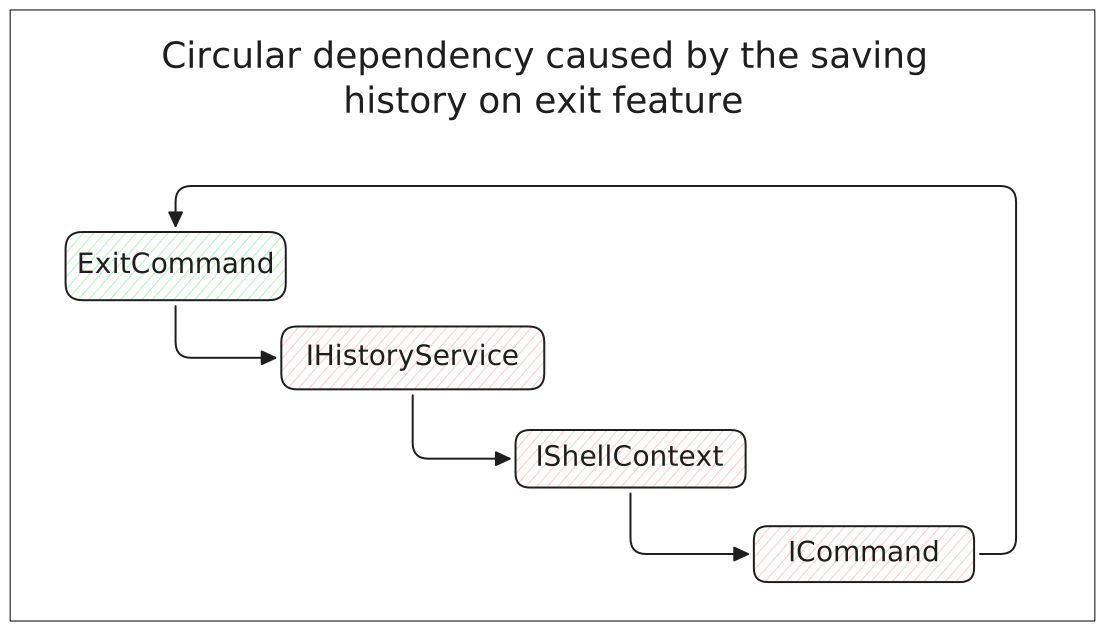 Circular Dependency Example
The fix was simple once I saw it. ExitCommand shouldn’t be in charge of saving the history, IShellContext should’ve handled that. The hard part wasn’t breaking the infinite loop, it was finding the cause.
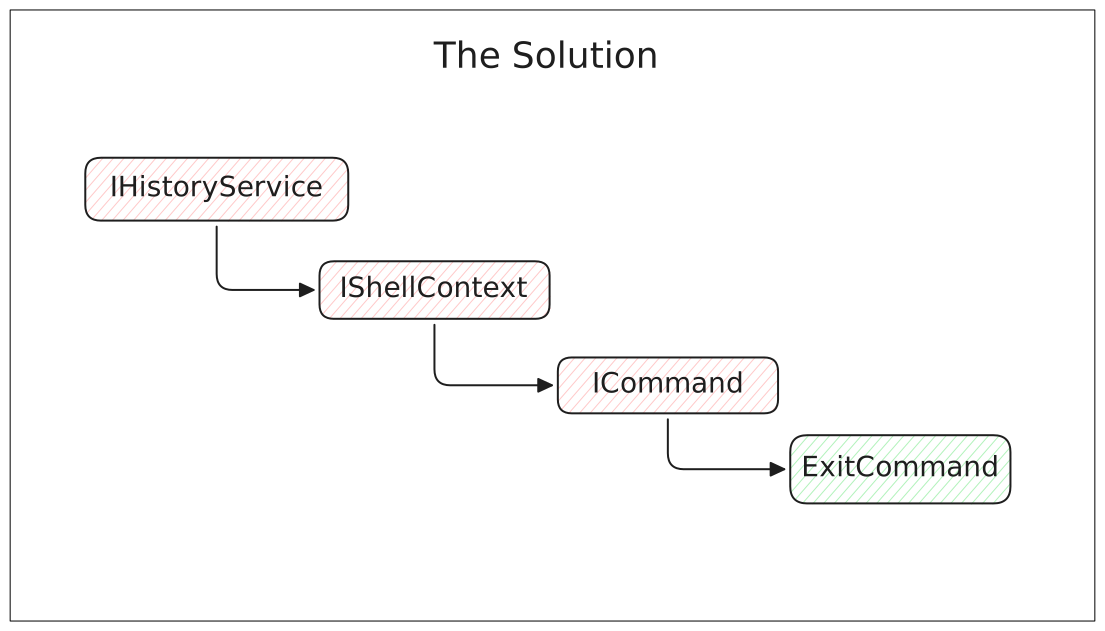 Circular Dependency Solution Example
The Lesson
Draw your dependency graph before you need it. DI containers won’t warn you about circular dependencies until runtime. By then, you’re staring at a hung process with no stack trace.
If I’d sketched the dependencies on paper first, I would have spotted the cycle immediately: ExitCommand depending on IHistoryService, depending on IShellContext, depending on IEnumerable
This applies to any DI-heavy system. ASP.NET, Spring, any framework with dependency injection. Don’t register services blindly. Map out what depends on what.
Once the dependency graph was stable, the next question was whether the system was actually testable. Clean architecture is not only about how components depend on each other, but also how easily they can be exercised in isolation.
Testability is a Design Choice
Most shell implementations are difficult to test. They use global state, hardcoded dependencies, and direct Console calls. Want to test command execution? Hope you enjoy spawning real processes and parsing actual stdout.
I took a different approach. Every component gets dependencies through constructor injection:
- Commands receive
IShellContext, not global state - Input handling gets
IConsole, not the realConsoleclass - PATH resolution is
IPathResolver, fully mockable - File operations go through injected writers
The payoff: I can test everything in isolation. Swap PathResolver for a test double. Mock the filesystem. Intercept stdout without touching real streams. Zero process spawning in tests.
Here’s a command test:
1
2
3
4
5
6
7
var mockContext = new Mock<IShellContext>();
mockContext.Setup(c => c.PathResolver.FindInPath("cat")).Returns("/usr/bin/cat");

var command = new ExternalCommand();
var result = command.Execute(new[] { "cat", "file.txt" }, mockContext.Object);

Assert.Equal(0, result);
No real processes. No filesystem access. Fast, deterministic tests.
The Lesson
If it’s hard to test, the design is wrong. Don’t write fewer tests. Refactor for testability.
Hard to test reveals:
- Too much coupling (extract interfaces)
- Hidden dependencies (make them explicit through constructors)
- Mixed concerns (split into smaller components)
Don’t treat testability as optional. It’s a forcing function for good design.
This applies everywhere. If your web controller is hard to test, you’ve got business logic in the wrong place. If your service class needs elaborate setup, it has too many dependencies. Fix the design.
Architecture Lessons Learned the Hard Way
1. Draw the Dependency Graph First
I learned about circular dependencies the hard way: staring at a hung process with no error message. If I’d sketched the dependency graph on paper before writing code, I would have spotted the cycle immediately.
Next time: Diagram dependencies before registering services. It takes 5 minutes and saves hours.
2. Abstract External Systems from Day One
I used Console.Write directly in the first version, then had to refactor everything to IConsole when I wanted to test the input handler. The refactor was extensive and touched code across the entire project.
Next time: If something talks to external systems (console, filesystem, network), wrap it in an interface from line one. Don’t wait until you need to test it.
3. Test Edge Cases You Can’t Imagine
I wrote example-based tests for the tokenizer: "echo 'hello world'" should parse to ["echo", "hello world"]. What I didn’t test: escaped quotes, nested quotes, edge cases with backslashes.
Next time: For parsers and input validation, generate test cases instead of writing them manually. Don’t rely on your imagination to find edge cases.
The Bigger Picture
Building a shell reinforced that architectural patterns aren’t domain-specific. Dependency injection isn’t “just for web apps.” Testability matters in CLI tools. Cross-platform abstractions work everywhere.
The constraints were different (no HTTP, no database, no authentication), but the design principles stayed the same:
- Isolate dependencies through interfaces
- Make testing easy by abstracting complexity
- Measure before optimizing
- Plan for the user-facing experience
Some developers gatekeep patterns by domain. “DI is for enterprise apps.” “Functional programming is for academics.” “Clean architecture is overkill for scripts.”
I disagree. Good architecture is universal. The shell proved it.
Architecture is never about frameworks or patterns. It is about choosing the right boundaries, owning the tradeoffs, and designing for clarity under constraints. The shell project made those constraints impossible to ignore, which is why the lessons transfer so cleanly to production systems.
If you’re curious about the full implementation, check out the GitHub repo.